mirror of
https://github.com/swri-robotics/mapviz.git
synced 2025-09-15 17:48:34 +08:00

190 lines
8.1 KiB
Markdown
190 lines
8.1 KiB
Markdown
mapviz
|
|
======
|
|
|
|
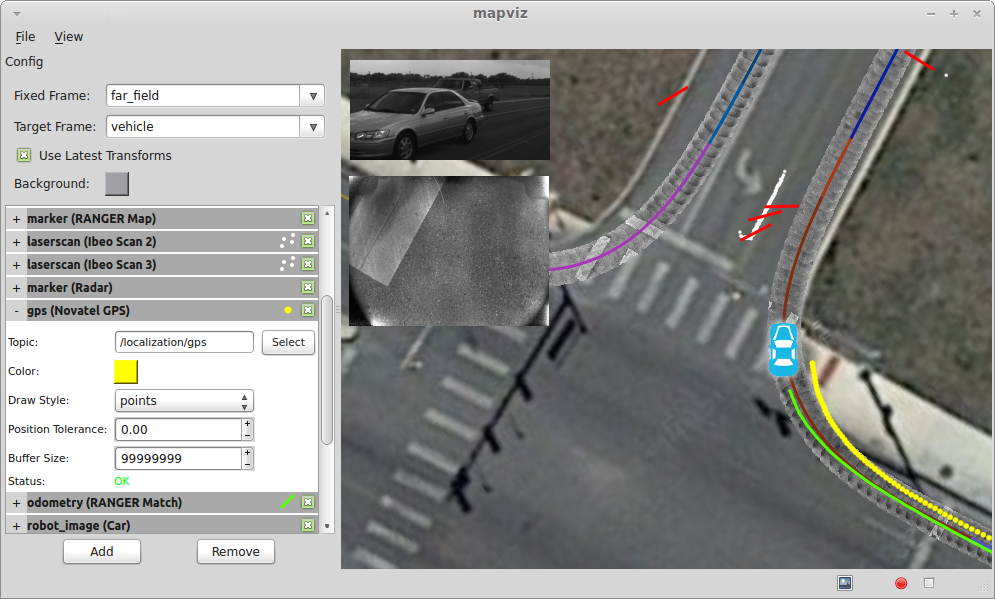
Mapviz is a [ROS](http://www.ros.org/) based visualization tool with a plug-in system similar to [RVIZ](http://wiki.ros.org/rviz) focused on visualizing 2D data.
|
|
|
|
|
|
|
|
Mapviz currently depends on the [marti_common](https://github.com/swri-robotics/marti_common) and [marti_messages](https://github.com/swri-robotics/marti_messages) repositories for some utility functions and message definitions.
|
|
|
|
Mapviz should be compatible with Ubuntu 12.04 through Ubuntu 14.04 and ROS Fuerte, Groovy, Hydro, and Indigo. The *master* branch uses the [rosbuild](http://wiki.ros.org/rosbuild) make system and the *catkin* branch uses [catkin](http://wiki.ros.org/catkin).
|
|
|
|
Installing ROS [Fuerte](http://wiki.ros.org/fuerte/Installation/Ubuntu), [Groovy](http://wiki.ros.org/groovy/Installation/Ubuntu), [Hydro](http://wiki.ros.org/hydro/Installation/Ubuntu), or [Indigo](http://wiki.ros.org/indigo/Installation/Ubuntu)
|
|
|
|
Additional Ubuntu dependencies beyond ROS base for mapviz:
|
|
|
|
$ sudo apt-get install ros-XXXX-tf ros-XXXX-common-msgs ros-XXXX-plugin-lib ros-XXXX-gps-umd \
|
|
ros-XXXX-nodelet ros-XXXX-cv-bridge ros-XXXX-image-geometry ros-XXXX-angles \
|
|
ros-XXXX-camera-calibration-parsers ros-XXXX-image-transport
|
|
|
|
$ sudo apt-get install yaml-cpp libboost-random-dev libblas-dev liblapack-dev libproj-dev \
|
|
libglew-dev freeglut3-dev libxmu-dev libgeos++-dev qt4-dev-tools
|
|
|
|
Plug-ins
|
|
--------
|
|
|
|
### Disparity
|
|
|
|
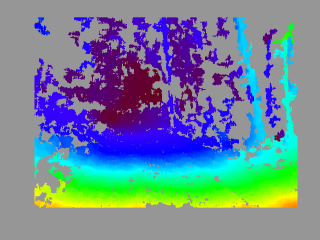
Overlays a [sensor_msgs::DisparityImage](http://docs.ros.org/api/stereo_msgs/html/msg/DisparityImage.html) onto the display using the ''jet'' color map.
|
|
|
|
|
|
|
|
**Parameters**
|
|
* Topic: The disparity topic name
|
|
* Anchor: (top left | top center | top right | center left | center | center right | bottom left | bottom center | bottom right)
|
|
* Offset X: Display offset from the left
|
|
* Offset Y: Display offset from the top
|
|
* Width: Display width
|
|
* Height: Display height
|
|
* Units: (pixels | percent of window)
|
|
|
|
### GPS
|
|
|
|
Projects [gps_common::GPSFix](http://docs.ros.org/hydro/api/gps_common/html/msg/GPSFix.html) message data into the scene.
|
|
|
|
**Parameters**
|
|
* Topic: The GPS topic
|
|
* Color: The color of the GPS data
|
|
* Draw Style: (lines | points | arrows)
|
|
* Position Tolerance: Distance threshold for adding new GPS points to visualization
|
|
* Buffer Size: Size of circular buffer of GPS points
|
|
|
|
### Grid
|
|
Projects a 2D grid into the scene.
|
|
|
|
**Parameters**
|
|
* Frame: Coordinate frame of the grid
|
|
* Color: Color of the grid
|
|
* Alpha: Alpha transparency of the grid
|
|
* X: X offset of the grid from the specified coordinate frame origin
|
|
* Y: Y offset of the grid from the specified coordinate frame origin
|
|
* Size: Size of each grid cell
|
|
* Rows: Number of grid rows
|
|
* Columns: Number of grid columns
|
|
|
|
### Image
|
|
|
|
Overlays a [sensor_msgs::Image](http://docs.ros.org/api/sensor_msgs/html/msg/Image.html) onto the display.
|
|
|
|
**Parameters**
|
|
* Topic: The image topic name
|
|
* Anchor: (top left | top center | top right | center left | center | center right | bottom left | bottom center | bottom right)
|
|
* Offset X: Display offset from the left
|
|
* Offset Y: Display offset from the top
|
|
* Width: Display width
|
|
* Height: Display height
|
|
* Units: (pixels | percent of window)
|
|
|
|
### LaserScan
|
|
|
|
Projects a [sensor_msgs::LaserScan](http://docs.ros.org/api/sensor_msgs/html/msg/LaserScan.html) message into the scene.
|
|
|
|
* Topic: The laser scan topic name
|
|
* Min Color: The color associated with minimum return intensity
|
|
* Max Color: The color associated with maximum return intensity
|
|
* Min Intesity: Minimum intensity value
|
|
* Max Intensity: Maximum intensity value
|
|
* Point Size: Display size of laser scan points in pixels
|
|
* Buffer Size: Size of circular buffer of laser scan messages points
|
|
|
|
### Marker
|
|
Projects a [visualization_msgs::Marker](http://docs.ros.org/api/visualization_msgs/html/msg/Marker.html) or [visualization_msgs::MarkerArray](http://docs.ros.org/api/visualization_msgs/html/msg/MarkerArray.html) into the scene.
|
|
|
|
[Markers](http://wiki.ros.org/rviz/DisplayTypes/Marker) are the most flexible display type and more or less mirror the [OpenGL primitives](https://www.opengl.org/wiki/Primitive).
|
|
|
|
**Parameters**
|
|
* Topic: The marker topic
|
|
|
|
### Multi-res Image
|
|
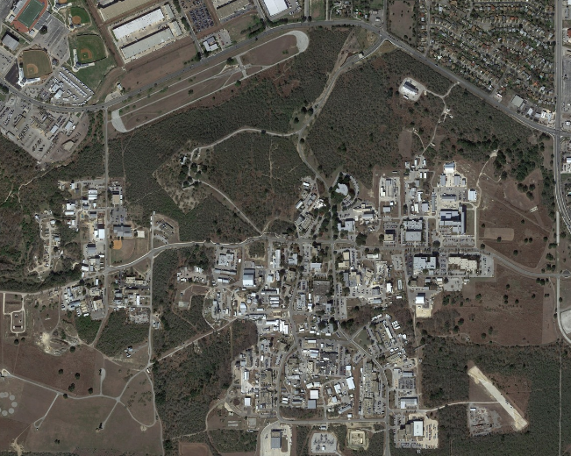
Projects a geo-referenced multi-resolution image tile map into the scene. The concept is the same as the Google Maps style pan/zoom satellite imagery.
|
|
|
|
|
|
|
|
**Parameters**
|
|
* Geo File: Path to the geo-referenced map tiles.
|
|
|
|
A custom format is currently used to store the map tiles and geo-reference. The geo-file has the following format:
|
|
|
|
image_path: "." # The relative path to the map tiles
|
|
image_width: 29184 # The full pixel width of the map
|
|
image_height: 15872 # The full pixel height of the map
|
|
tile_size: 512 # The pixel size of the individual tiles
|
|
|
|
datum: "wgs84" # Datum is currently ignored
|
|
projection: "utm" # (utm|wgs84)
|
|
|
|
# At least 2 tie points are required for
|
|
# scale, and 3 for orientation.
|
|
tiepoints: # [pixel x, pixel y, geo x, geo y]
|
|
- point: [4799, 209, 535674.5, 3258382.5]
|
|
- point: [2336, 15596, 535329.5, 3256198.5]
|
|
- point: [26925, 15457, 538837.5, 3256233.5]
|
|
- point: [29133, 84, 539142.5, 3258416.5]
|
|
|
|
The map tiles are stored in directories for each resolution starting with layer0, the full resolution. In subsequent layers the resolution is halved until the entire map fits within a single tile.
|
|
|
|
Tiles are named using the following format:
|
|
|
|
tile%05dx%05d.png % (row, column)
|
|
|
|
### Odometry
|
|
|
|
Projects [nav_msgs::Odometry](http://docs.ros.org/api/nav_msgs/html/msg/Odometry.html) message data into the scene.
|
|
|
|
**Parameters**
|
|
* Topic: The odometry topic
|
|
* Color: The color of the odometry data
|
|
* Draw Style: (lines | points | arrows)
|
|
* Show Covariance: Draw covariance ellipse around latest data
|
|
* Position Tolerance: Distance threshold for adding new odometry points to visualization
|
|
* Buffer Size: Size of circular buffer of odometry points
|
|
|
|
### Path
|
|
|
|
Projects [nav_msgs::Path](http://docs.ros.org/api/nav_msgs/html/msg/Path.html) message data into the scene.
|
|
|
|
**Parameters**
|
|
* Topic: The path topic
|
|
|
|
### Robot Image
|
|
|
|
Projects an image loaded from file into the scene to represent the robot platform.
|
|
|
|
**Parameters**
|
|
* Image File: Path to the image file
|
|
* Frame: Frame to tie the image to
|
|
* Width: The physical width represented by the image
|
|
* Height: The physical height represented by the image
|
|
|
|
### Textured Marker
|
|
|
|
Projects marti_visualization_msgs::TexturedMarker and marti_visualization_msgs::TexturedMarkerArray message data into the scene.
|
|
|
|
Textured markers follow the same general approach as traditional markers, but can be used to texture dense image data onto a quad which is projected into the scene.
|
|
|
|
**Parameters**
|
|
* Topic: The textured marker topic
|
|
|
|
### Tile Map
|
|
Projects a geo-referenced multi-resolution image tile map into the scene. Data is automatically streamed from [OpenMapQuest](http://open.mapquest.com/) (satellite and roads) or [Stamen Design] (http://maps.stamen.com/) (terrain, watercolor, and toner). Custom or local map servers can also be specified. Map data is cached to disk which enables some limited use completely offline.
|
|
|
|
<img src="https://github.com/swri-robotics/mapviz/wiki/satellite.png" width="200" height="200" />
|
|
<img src="https://github.com/swri-robotics/mapviz/wiki/roads.png" width="200" height="200" />
|
|
<img src="https://github.com/swri-robotics/mapviz/wiki/terrain.png" width="200" height="200" />
|
|
<img src="https://github.com/swri-robotics/mapviz/wiki/watercolor.png" width="200" height="200" />
|
|
<img src="https://github.com/swri-robotics/mapviz/wiki/toner.png" width="200" height="200" />
|
|
|
|
**Parameters**
|
|
* Source: The source of the tile data.
|
|
|
|
### TF Frame
|
|
|
|
Projects [Tf](http://wiki.ros.org/tf) data into the scene similar to the Odometry plug-in.
|
|
|
|
**Parameters**
|
|
* Frame: The Tf frame
|
|
* Color: The color of the Tf data
|
|
* Draw Style: (lines | points | arrows)
|
|
* Position Tolerance: Distance threshold for adding new Tf points to visualization
|
|
* Buffer Size: Size of circular buffer of Tf points
|