
11 KiB
FunASR-1.x.x 注册模型教程
(简体中文|English)
funasr-1.x.x 版本的设计初衷是【让模型集成更简单】,核心feature为注册表与AutoModel:
-
注册表的引入,使得开发中可以用搭积木的方式接入模型,兼容多种task;
-
新设计的AutoModel接口,统一modelscope、huggingface与funasr推理与训练接口,支持自由选择下载仓库;
-
支持模型导出,demo级别服务部署,以及工业级别多并发服务部署;
-
统一学术与工业模型推理训练脚本;
快速上手
基于automodel用法
SenseVoiceSmall模型
输入任意时长语音,输出为语音内容对应文字,文字具有标点断句,支持中英日粤韩5中语言。【字级别时间戳,以及说话人身份】后续会支持。
from funasr import AutoModel
from funasr.utils.postprocess_utils import rich_transcription_postprocess

model = AutoModel(
    model="iic/SenseVoiceSmall",
    vad_model="fsmn-vad",
    vad_kwargs={"max_single_segment_time": 30000},
    device="cuda:0",
)

res = model.generate(
    input=f"{model.model_path}/example/en.mp3",
    language="auto",  # "zn", "en", "yue", "ja", "ko", "nospeech"
    use_itn=True,
    batch_size_s=60,
)
text = rich_transcription_postprocess(res[0]["text"])
print(text) #👏Senior staff, Priipal Doris Jackson, Wakefield faculty, and, of course, my fellow classmates.I am honored to have been chosen to speak before my classmates, as well as the students across America today.
API文档
AutoModel 定义
model = AutoModel(model=[str], device=[str], ncpu=[int], output_dir=[str], batch_size=[int], hub=[str], **kwargs)
-
model(str): 模型仓库 中的模型名称,或本地磁盘中的模型路径 -
device(str):cuda:0(默认gpu0),使用 GPU 进行推理,指定。如果为cpu,则使用 CPU 进行推理 -
ncpu(int):4(默认),设置用于 CPU 内部操作并行性的线程数 -
output_dir(str):None(默认),如果设置,输出结果的输出路径 -
batch_size(int):1(默认),解码时的批处理,样本个数 -
hub(str):ms(默认),从modelscope下载模型。如果为hf,从huggingface下载模型。 -
**kwargs(dict): 所有在config.yaml中参数,均可以直接在此处指定,例如,vad模型中最大切割长度max_single_segment_time=6000(毫秒)。
AutoModel 推理
res = model.generate(input=[str], output_dir=[str])
-
-
wav文件路径, 例如: asr_example.wav
-
pcm文件路径, 例如: asr_example.pcm,此时需要指定音频采样率fs(默认为16000)
-
音频字节数流,例如:麦克风的字节数数据
-
wav.scp,kaldi 样式的 wav 列表 (
wav_id \t wav_path), 例如:
-
asr_example1  ./audios/asr_example1.wav
asr_example2  ./audios/asr_example2.wav
在这种输入
-
音频采样点,例如:
audio, rate = soundfile.read("asr_example_zh.wav"), 数据类型为 numpy.ndarray。支持batch输入,类型为list:[audio_sample1, audio_sample2, ..., audio_sampleN] -
fbank输入,支持组batch。shape为[batch, frames, dim],类型为torch.Tensor,例如
-
output_dir: None (默认),如果设置,输出结果的输出路径 -
**kwargs(dict): 与模型相关的推理参数,例如,beam_size=10,decoding_ctc_weight=0.1。
详细文档链接:https://github.com/modelscope/FunASR/blob/main/examples/README_zh.md
注册表详解
以SenseVoiceSmall模型为例,讲解如何注册新模型,模型链接:
modelscope:https://www.modelscope.cn/models/iic/SenseVoiceSmall/files
huggingface:https://huggingface.co/FunAudioLLM/SenseVoiceSmall
模型资源目录
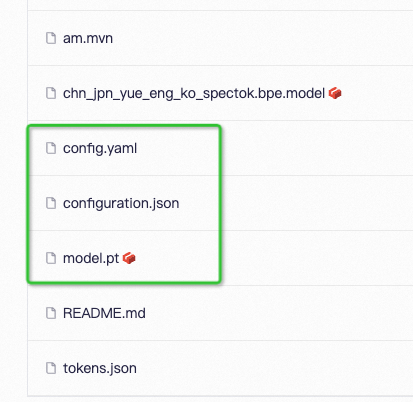
配置文件:config.yaml
encoder: SenseVoiceEncoderSmall
encoder_conf:
    output_size: 512
    attention_heads: 4
    linear_units: 2048
    num_blocks: 50
    tp_blocks: 20
    dropout_rate: 0.1
    positional_dropout_rate: 0.1
    attention_dropout_rate: 0.1
    input_layer: pe
    pos_enc_class: SinusoidalPositionEncoder
    normalize_before: true
    kernel_size: 11
    sanm_shfit: 0
    selfattention_layer_type: sanm


model: SenseVoiceSmall
model_conf:
    length_normalized_loss: true
    sos: 1
    eos: 2
    ignore_id: -1

tokenizer: SentencepiecesTokenizer
tokenizer_conf:
  bpemodel: null
  unk_symbol: <unk>
  split_with_space: true

frontend: WavFrontend
frontend_conf:
    fs: 16000
    window: hamming
    n_mels: 80
    frame_length: 25
    frame_shift: 10
    lfr_m: 7
    lfr_n: 6
    cmvn_file: null


dataset: SenseVoiceCTCDataset
dataset_conf:
  index_ds: IndexDSJsonl
  batch_sampler: EspnetStyleBatchSampler
  data_split_num: 32
  batch_type: token
  batch_size: 14000
  max_token_length: 2000
  min_token_length: 60
  max_source_length: 2000
  min_source_length: 60
  max_target_length: 200
  min_target_length: 0
  shuffle: true
  num_workers: 4
  sos: ${model_conf.sos}
  eos: ${model_conf.eos}
  IndexDSJsonl: IndexDSJsonl
  retry: 20

train_conf:
  accum_grad: 1
  grad_clip: 5
  max_epoch: 20
  keep_nbest_models: 10
  avg_nbest_model: 10
  log_interval: 100
  resume: true
  validate_interval: 10000
  save_checkpoint_interval: 10000

optim: adamw
optim_conf:
  lr: 0.00002
scheduler: warmuplr
scheduler_conf:
  warmup_steps: 25000
模型参数:model.pt
路径解析:configuration.json(非必需)
{
  "framework": "pytorch",
  "task" : "auto-speech-recognition",
  "model": {"type" : "funasr"},
  "pipeline": {"type":"funasr-pipeline"},
  "model_name_in_hub": {
    "ms":"",
    "hf":""},
  "file_path_metas": {
    "init_param":"model.pt",
    "config":"config.yaml",
    "tokenizer_conf": {"bpemodel": "chn_jpn_yue_eng_ko_spectok.bpe.model"},
    "frontend_conf":{"cmvn_file": "am.mvn"}}
}
configuration.json的作用是给file_path_metas中的item拼接上模型根目录,以便于路径能够被正确的解析,以上为例,假设模型根目录为:/home/zhifu.gzf/init_model/SenseVoiceSmall,目录中config.yaml中的相关路径被替换成了正确的路径(忽略无关配置):
init_param: /home/zhifu.gzf/init_model/SenseVoiceSmall/model.pt

tokenizer_conf:
  bpemodel: /home/zhifu.gzf/init_model/SenseVoiceSmall/chn_jpn_yue_eng_ko_spectok.bpe.model

frontend_conf:
    cmvn_file: /home/zhifu.gzf/init_model/SenseVoiceSmall/am.mvn
注册表

查看注册表
from funasr.register import tables

tables.print()
支持查看指定类型的注册表:`tables.print("model")`,目前funasr已经注册模型如上图所示。目前预先定义了如下几个分类:
    model_classes = {}
    frontend_classes = {}
    specaug_classes = {}
    normalize_classes = {}
    encoder_classes = {}
    decoder_classes = {}
    joint_network_classes = {}
    predictor_classes = {}
    stride_conv_classes = {}
    tokenizer_classes = {}
    dataloader_classes = {}
    batch_sampler_classes = {}
    dataset_classes = {}
    index_ds_classes = {}
注册模型
from funasr.register import tables

@tables.register("model_classes", "SenseVoiceSmall")
class SenseVoiceSmall(nn.Module):
  def __init__(*args, **kwargs):
    ...

  def forward(
      self,
      **kwargs,
  ):

  def inference(
      self,
      data_in,
      data_lengths=None,
      key: list = None,
      tokenizer=None,
      frontend=None,
      **kwargs,
  ):
    ...
在需要注册的类名前加上 @tables.register("model_classes", "SenseVoiceSmall"),即可完成注册,类需要实现有:__init__,forward,inference方法。
register用法:
@tables.register("注册分类", "注册名")
其中,"注册分类"可以是预先定义好的分类(见上面图),如果是自己定义的新分类,会自动将新分类写进注册表分类中,"注册名"即希望注册名字,后续可以直接来使用。
完整代码:https://github.com/modelscope/FunASR/blob/main/funasr/models/sense_voice/model.py#L443
注册完成后,在config.yaml中指定新注册模型,即可实现对模型的定义
model: SenseVoiceSmall
model_conf:
  ...
注册失败
如果出现找不到注册模型或发方法,assert model_class is not None, f'{kwargs["model"]} is not registered'。模型注册的原理是,import 模型文件,可以通过import来查看具体注册失败原因,例如,上述模型文件为,funasr/models/sense_voice/model.py:
from funasr.models.sense_voice.model import *
注册原则
-
Model:模型之间互相独立,每一个模型,都需要在funasr/models/下面新建一个模型目录,不要采用类的继承方法!!!不要从其他模型目录中import,所有需要用到的都单独放到自己的模型目录中!!!不要修改现有的模型代码!!!
-
dataset,frontend,tokenizer,如果能复用现有的,直接复用,如果不能复用,请注册一个新的,再修改,不要修改原来的!!!
独立仓库
可以作为独立仓库存在,用于代码保密,或者独立开源。基于注册机制,无需集成到funasr中,使用funasr进行推理,也可以直接进行推理,同样支持finetune
使用AutoModel进行推理
from funasr import AutoModel

# trust_remote_code:`True` 表示 model 代码实现从 `remote_code` 处加载,`remote_code` 指定 `model` 具体代码的位置(例如,当前目录下的 `model.py`),支持绝对路径与相对路径,以及网络 url。
model = AutoModel(
    model="iic/SenseVoiceSmall",
    trust_remote_code=True,
    remote_code="./model.py",
)
直接进行推理
from model import SenseVoiceSmall

m, kwargs = SenseVoiceSmall.from_pretrained(model="iic/SenseVoiceSmall")
m.eval()

res = m.inference(
    data_in=f"{kwargs ['model_path']}/example/en.mp3",
    language="auto", # "zh", "en", "yue", "ja", "ko", "nospeech"
    use_itn=False,
    ban_emo_unk=False,
    **kwargs,
)

print(text)
微调参考:https://github.com/FunAudioLLM/SenseVoice/blob/main/finetune.sh