mirror of
https://github.com/kingmo888/rustdesk-api-server.git
synced 2025-09-15 15:28:42 +08:00

210 lines
8.8 KiB
Markdown
210 lines
8.8 KiB
Markdown
# rustdesk-api-server
|
|
|
|
## If the project has helped you, giving a star isn't too much, right?
|
|
|
|
## Please use the latest version 1.2.3 of the client.
|
|
|
|
[点击这里查看中文说明。](https://github.com/kingmo888/rustdesk-api-server/blob/master/README.md)
|
|
|
|
<p align="center">
|
|
<i>A Rustdesk API interface implemented in Python, with WebUI management support</i>
|
|
<br/>
|
|
<img src ="https://img.shields.io/badge/Version-1.5.1-blueviolet.svg"/>
|
|
<img src ="https://img.shields.io/badge/Python-3.7|3.8|3.9|3.10|3.11-blue.svg" />
|
|
<img src ="https://img.shields.io/badge/Django-3.2+|4.x-yelow.svg" />
|
|
<br/>
|
|
<img src ="https://img.shields.io/badge/Platform-Windows|Linux-green.svg"/>
|
|
<img src ="https://img.shields.io/badge/Docker-arm|arm64|amd64-blue.svg" />
|
|
</p>
|
|
|
|

|
|
|
|
## Features
|
|
|
|
- Supports self-registration and login on the front-end webpage.
|
|
- Registration and login pages:
|
|

|
|

|
|
|
|
- Supports displaying device information on the front end, divided into administrator and user versions.
|
|
- Supports custom aliases (remarks).
|
|
- Supports backend management.
|
|
- Supports colored tags.
|
|

|
|
|
|
- Supports device online statistics.
|
|
- Supports saving device passwords.
|
|
- Automatically manages tokens and keeps them alive using the heartbeat interface.
|
|
- Supports sharing devices with other users.
|
|

|
|
- Supports web control terminal (currently only supports non-SSL mode, see below for usage issues)
|
|

|
|
|
|
Admin Home Page:
|
|

|
|
|
|
## Installation
|
|
|
|
### Method 1: Out-of-the-box
|
|
|
|
Only supports Windows, please go to the release to download, no need to install environment, just run `启动.bat` directly. Screenshots:
|
|
|
|

|
|
|
|
|
|
### Method 2: Running the Code
|
|
|
|
```bash
|
|
# Clone the code locally
|
|
git clone https://github.com/kingmo888/rustdesk-api-server.git
|
|
# Enter the directory
|
|
cd rustdesk-api-server
|
|
# Install dependencies
|
|
pip install -r requirements.txt
|
|
# After ensuring dependencies are installed correctly, execute:
|
|
# Please modify the port number yourself, it is recommended to keep 21114 as the default port for Rustdesk API
|
|
python manage.py runserver 0.0.0.0:21114
|
|
```
|
|
|
|
Now you can access it using `http://localhostIP:Port`.
|
|
|
|
**Note**: When configuring on CentOS, Django4 may have problems due to the low version of sqlite3 in the system. Please modify the file in the dependency library. Path: `xxxx/Lib/site-packages/django/db/backends/sqlite3/base.py` (Find the package address according to the situation), modify the content:
|
|
```python
|
|
# from sqlite3 import dbapi2 as Database #(comment out this line)
|
|
from pysqlite3 import dbapi2 as Database # enable pysqlite3
|
|
```
|
|
|
|
### Method 3: Docker Run
|
|
|
|
#### Docker Method 1: Build Yourself
|
|
```bash
|
|
git clone https://github.com/kingmo888/rustdesk-api-server.git
|
|
cd rustdesk-api-server
|
|
docker compose --compatibility up --build -d
|
|
```
|
|
Thanks to the enthusiastic netizen @ferocknew for providing.
|
|
|
|
#### Docker Method 2: Pre-built Run
|
|
|
|
docker run command:
|
|
|
|
```bash
|
|
docker run -d \
|
|
--name rustdesk-api-server \
|
|
-p 21114:21114 \
|
|
-e CSRF_TRUSTED_ORIGINS=http://yourdomain.com:21114 \ #Cross-origin trusted source, optional
|
|
-e ID_SERVER=yourdomain.com \ #ID server used by the web control terminal
|
|
-v /yourpath/db:/rustdesk-api-server/db \ #Modify /yourpath/db to your host database mount directory
|
|
-v /etc/timezone:/etc/timezone:ro \
|
|
-v /etc/localtime:/etc/localtime:ro \
|
|
--network bridge \
|
|
--restart unless-stopped \
|
|
ghcr.io/kingmo888/rustdesk-api-server:latest
|
|
```
|
|
|
|
docker-compose method:
|
|
|
|
```yaml
|
|
version: "3.8"
|
|
services:
|
|
rustdesk-api-server:
|
|
container_name: rustdesk-api-server
|
|
image: ghcr.io/kingmo888/rustdesk-api-server:latest
|
|
environment:
|
|
- CSRF_TRUSTED_ORIGINS=http://yourdomain.com:21114 #Cross-origin trusted source, optional
|
|
- ID_SERVER=yourdomain.com #ID server used by the web control terminal
|
|
volumes:
|
|
- /yourpath/db:/rustdesk-api-server/db #Modify /yourpath/db to your host database mount directory
|
|
- /etc/timezone:/etc/timezone:ro
|
|
- /etc/localtime:/etc/localtime:ro
|
|
network_mode: bridge
|
|
ports:
|
|
- "21114:21114"
|
|
restart: unless-stopped
|
|
```
|
|
|
|
## Environment Variables
|
|
|
|
| Variable Name | Reference Value | Note |
|
|
| ---- | ------- | ----------- |
|
|
| `HOST` | Default `0.0.0.0` | IP binding of the service |
|
|
| `TZ` | Default `Asia/Shanghai`, optional | Timezone |
|
|
| `SECRET_KEY` | Optional, custom a random string | Program encryption key |
|
|
| `CSRF_TRUSTED_ORIGINS` | Optional, verification off by default;<br>If you need to enable it, fill in your access address `http://yourdomain.com:21114` <br>**To disable verification, please delete this variable instead of leaving it blank** | Cross-origin trusted source |
|
|
| `ID_SERVER` | Optional, default is the same host as the API server.<br>Customizable like `yourdomain.com` | ID server used by the web control terminal |
|
|
| `DEBUG` | Optional, default `False` | Debug mode |
|
|
| `ALLOW_REGISTRATION` | Optional, default `True` | Whether to allow new user registration |
|
|
| Database Configuration | -- Start -- | If not using MYSQL, the following are unnecessary |
|
|
| `DATABASE_TYPE` | Optional, default `SQLITE3` | Database type (SQLITE/MYSQL) |
|
|
| `MYSQL_DBNAME` | Optional, default `-` | MYSQL database name |
|
|
| `MYSQL_HOST` | Optional, default `127.0.0.1` | MYSQL database server IP |
|
|
| `MYSQL_USER` | Optional, default `-` | MYSQL database username |
|
|
| `MYSQL_PASSWORD` | Optional, default `-` | MYSQL database password |
|
|
| `MYSQL_PORT` | Optional, default `3306` | MYSQL database port |
|
|
| Database Configuration | -- End -- | See [sqlite3 migration to mysql tutorial](/tutorial/sqlite2mysql.md) |
|
|
|
|
## Usage Issues
|
|
|
|
- Administrator Settings
|
|
|
|
When there are no accounts in the database, the first registered account directly obtains super administrator privileges,
|
|
|
|
and subsequently registered accounts are ordinary accounts.
|
|
|
|
- Device Information
|
|
|
|
Tested, the client will send device information to the API interface regularly in the mode of installation as a service under non-green mode, so if you want device information, you need to install the Rustdesk client and start the service.
|
|
|
|
- Slow Connection Speed
|
|
|
|
The new version Key mode connection speed is slow. You can start the service on the server without the -k parameter. At this time, the client cannot configure the key either.
|
|
|
|
- Web Control Terminal Configuration
|
|
|
|
- Set the ID_SERVER environment variable or modify the ID_SERVER configuration item in the rustdesk_server_api/settings.py file and fill in the IP or domain name of the ID server/relay server.
|
|
|
|
- Web Control Terminal Keeps Spinning
|
|
|
|
- Check if the ID server filling is correct.
|
|
|
|
- The web control terminal currently only supports non-SSL mode. If the webui is accessed via https, remove the 's', otherwise ws cannot connect and keeps spinning. For example: https://domain.com/webui, change to http://domain.com/webui
|
|
|
|
- CSRF verification failed when logging in or logging out of backend operations. Request interrupted.
|
|
|
|
This operation is highly likely to be a combination of docker configuration + nginx reverse proxy + SSL. Pay attention to modifying CSRF_TRUSTED_ORIGINS. If it is SSL, it starts with https, otherwise it is http.
|
|
|
|
## Development Plans
|
|
|
|
- [x] Share devices with other registered users (v1.3+)
|
|
|
|
> Explanation: Similar to sharing URLs of network disks, the URL can be activated to obtain devices under a certain group or certain label.
|
|
> Note: In fact, there is not much that can be done with the web API as middleware. More functions still need to be implemented by modifying the client, which is not very worthwhile.
|
|
|
|
- [x] Integration of Web client form (v1.4+)
|
|
|
|
> Integrating the great god's web client, already integrated. [Source](https://www.52pojie.cn/thread-1708319-1-1.html)
|
|
|
|
- [x] Filter expired (offline) devices to distinguish between online and offline devices (1.4.7)
|
|
|
|
> By configuration, clean or filter devices that have expired for more than a specified time.
|
|
|
|
- [x] Split the first screen into user list page and administrator list page and add pagination (1.4.6).
|
|
|
|
- [x] Support exporting information to xlsx files (1.4.6).
|
|
|
|
> Allows administrators to export all device information on the [All Devices] page.
|
|
|
|
- [x] Set whether to allow new user registration through configuration items (1.4.7).
|
|
|
|
- [x] Support mysql and sqlite3 migration to mysql (1.4.8).
|
|
|
|
## Other Related Tools
|
|
|
|
- [CMD script for modifying client ID](https://github.com/abdullah-erturk/RustDesk-ID-Changer)
|
|
|
|
- [rustdesk](https://github.com/rustdesk/rustdesk)
|
|
|
|
- [rustdesk-server](https://github.com/rustdesk/rustdesk-server)
|
|
|
|
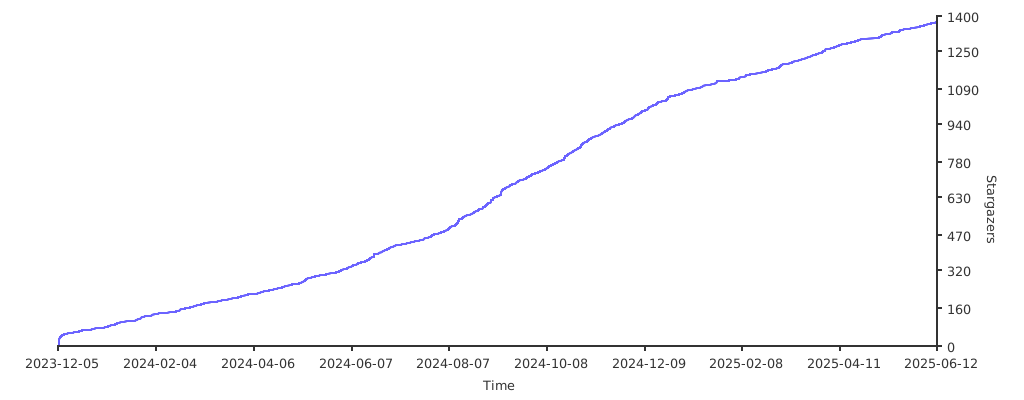
## Stargazers over time
|
|
[](https://starchart.cc/kingmo888/rustdesk-api-server) |