mirror of
https://github.com/Zeyi-Lin/HivisionIDPhotos.git
synced 2025-09-15 14:58:34 +08:00

427 lines
16 KiB
Markdown
427 lines
16 KiB
Markdown
<div align="center">
|
||
|
||
<img alt="hivision_logo" src="assets/hivision_logo.png" width=120 height=120>
|
||
<h1>HivisionIDPhoto</h1>
|
||
|
||
[English](README_EN.md) / [中文](README.md) / 日本語 / [한국어](README_KO.md)
|
||
|
||
[![][release-shield]][release-link]
|
||
[![][dockerhub-shield]][dockerhub-link]
|
||
[![][github-stars-shield]][github-stars-link]
|
||
[![][github-issues-shield]][github-issues-link]
|
||
[![][github-contributors-shield]][github-contributors-link]
|
||
[![][github-forks-shield]][github-forks-link]
|
||
[![][license-shield]][license-link]
|
||
[![][wechat-shield]][wechat-link]
|
||
[![][spaces-shield]][spaces-link]
|
||
[![][swanhub-demo-shield]][swanhub-demo-link]
|
||
|
||
[![][trendshift-shield]][trendshift-link]
|
||
|
||
<img src="assets/demoImage.png" width=900>
|
||
|
||
</div>
|
||
|
||
<br>
|
||
|
||
> **関連プロジェクト**:
|
||
>
|
||
> - [SwanLab](https://github.com/SwanHubX/SwanLab):トレーニング用のポートレート切り抜きモデルの分析と監視に使用し、実験室の仲間と協力してコミュニケーションを取ることで、トレーニング効率を大幅に向上させました。
|
||
|
||
<br>
|
||
|
||
# 目次
|
||
|
||
- [プロジェクトの更新](#-プロジェクトの更新)
|
||
- [概要](#overview)
|
||
- [準備作業](#-準備作業)
|
||
- [デモの起動](#-実行-gradio-demo)
|
||
- [Python推論](#-python-推論)
|
||
- [APIサービスのデプロイ](#️-デプロイ-api-サービス)
|
||
- [Dockerデプロイ](#-docker-デプロイ)
|
||
- [リンク集](#-リンク集)
|
||
- [お問い合わせ](#-お問い合わせ)
|
||
- [貢献者](#貢献者)
|
||
|
||
<br>
|
||
|
||
# 🤩 プロジェクトの更新
|
||
|
||
- オンライン体験: [](https://swanhub.co/ZeYiLin/HivisionIDPhotos/demo)、[](https://huggingface.co/spaces/TheEeeeLin/HivisionIDPhotos)
|
||
|
||
- 2024.09.08: 新しい背景除去モデル [RMBG-1.4](https://huggingface.co/briaai/RMBG-1.4) を追加しました | ComfyUI ワークフロー - [HivisionIDPhotos-ComfyUI](https://github.com/AIFSH/HivisionIDPhotos-ComfyUI) は [AIFSH](https://github.com/AIFSH/HivisionIDPhotos-ComfyUI) によって提供されました
|
||
- 2024.09.07: **顔検出APIオプション** [Face++](docs/face++_EN.md)を追加し、より高精度な顔検出を実現
|
||
- 2024.09.06: 新しい切り抜きモデル [modnet_photographic_portrait_matting.onnx](https://github.com/ZHKKKe/MODNet)を追加
|
||
- 2024.09.05: [Restful API ドキュメント](docs/api_EN.md)を更新
|
||
- 2024.09.02: **写真のKBサイズ調整**を更新、[DockerHub](https://hub.docker.com/r/linzeyi/hivision_idphotos/tags)
|
||
- 2023.12.01: **APIデプロイ(fastapiベース)**を更新
|
||
- 2023.06.20: **プリセットサイズメニュー**を更新
|
||
|
||
# 概要
|
||
|
||
> 🚀 私たちの仕事に興味を持っていただきありがとうございます。画像分野での他の成果もご覧になりたい場合は、zeyi.lin@swanhub.coまでご連絡ください。
|
||
|
||
HivisionIDPhotoは、実用的で体系的な証明写真のスマート制作アルゴリズムを開発することを目的としています。
|
||
|
||
このアルゴリズムは、さまざまなユーザーの撮影シーンを認識し、切り抜き、証明写真を生成するために、整ったAIモデルのワークフローを利用しています。
|
||
|
||
**HivisionIDPhotoは次のことができます:**
|
||
|
||
1. 軽量な切り抜き(完全オフライン、**CPU**のみで高速推論可能)
|
||
2. 異なるサイズ仕様に基づいて、異なる標準証明写真や六寸レイアウト写真を生成
|
||
3. 完全オフラインまたはエッジクラウド推論をサポート
|
||
4. 美顔(待機中)
|
||
5. スーツの自動変更(待機中)
|
||
|
||
<div align="center">
|
||
<img src="assets/harry.png" width=900>
|
||
</div>
|
||
|
||
---
|
||
|
||
HivisionIDPhotoがあなたの役に立った場合は、このリポジトリにスターを付けるか、友人に推薦して、証明写真の緊急制作問題を解決してください!
|
||
|
||
<br>
|
||
|
||
# 🔧 準備作業
|
||
|
||
環境のインストールと依存関係:
|
||
- Python >= 3.7(プロジェクトは主にPython 3.10でテストされています)
|
||
- OS: Linux, Windows, MacOS
|
||
|
||
## 1. プロジェクトをクローン
|
||
|
||
```bash
|
||
git clone https://github.com/Zeyi-Lin/HivisionIDPhotos.git
|
||
cd HivisionIDPhotos
|
||
```
|
||
|
||
## 2. 依存環境をインストール
|
||
|
||
> condaでpython3.10の仮想環境を作成し、以下のコマンドを実行することをお勧めします。
|
||
|
||
```bash
|
||
pip install -r requirements.txt
|
||
pip install -r requirements-app.txt
|
||
```
|
||
|
||
## 3. 重みファイルをダウンロード
|
||
|
||
**方法一:スクリプトでダウンロード**
|
||
|
||
```bash
|
||
python scripts/download_model.py --models all
|
||
```
|
||
|
||
**方法二:直接ダウンロード**
|
||
|
||
プロジェクトの`hivision/creator/weights`ディレクトリに保存:
|
||
- `modnet_photographic_portrait_matting.onnx` (24.7MB): [MODNet](https://github.com/ZHKKKe/MODNet)公式重み、[ダウンロード](https://github.com/Zeyi-Lin/HivisionIDPhotos/releases/download/pretrained-model/modnet_photographic_portrait_matting.onnx)
|
||
- `hivision_modnet.onnx` (24.7MB): 単色背景に適した切り抜きモデル、[ダウンロード](https://github.com/Zeyi-Lin/HivisionIDPhotos/releases/download/pretrained-model/hivision_modnet.onnx)
|
||
- `mnn_hivision_modnet.mnn` (24.7MB): mnn変換後の切り抜きモデル by [zjkhahah](https://github.com/zjkhahah)、[ダウンロード](https://github.com/Zeyi-Lin/HivisionIDPhotos/releases/download/pretrained-model/mnn_hivision_modnet.mnn)
|
||
- `rmbg-1.4.onnx` (176.2MB): [BRIA AI](https://huggingface.co/briaai/RMBG-1.4)からのオープンソースマッティングモデルです。[ダウンロード](https://huggingface.co/briaai/RMBG-1.4/resolve/main/onnx/model.onnx?download=true)して、`rmbg-1.4.onnx`に名前を変更してください。
|
||
|
||
## 4. 顔検出モデルの設定
|
||
|
||
> これはオプションです。
|
||
|
||
| 拡張顔検出モデル | 説明 | 使用文書 |
|
||
| -- | -- | -- |
|
||
| MTCNN | **オフライン**顔検出モデル、高性能CPU推論、デフォルトモデル、検出精度は低め | このプロジェクトをクローン後に直接使用 |
|
||
| Face++ | Megviiが提供するオンライン顔検出API、高精度の検出、[公式文書](https://console.faceplusplus.com.cn/documents/4888373) | [使用文書](docs/face++_EN.md)|
|
||
|
||
<br>
|
||
|
||
# 🚀 Gradioデモの実行
|
||
|
||
```bash
|
||
python app.py
|
||
```
|
||
|
||
プログラムを実行すると、ローカルWebページが生成され、そのページで証明写真の操作とインタラクションができます。
|
||
|
||
<br>
|
||
|
||
# 🚀 Python推論
|
||
|
||
コアパラメータ:
|
||
|
||
- `-i`: 入力画像パス
|
||
- `-o`: 保存画像パス
|
||
- `-t`: 推論タイプ、idphoto、human_matting、add_background、generate_layout_photosから選択
|
||
- `--matting_model`: 人物切り抜きモデルの重み選択、`hivision_modnet`、`modnet_photographic_portrait_matting`が選択可能
|
||
|
||
詳細なパラメータは、`python inference.py --help`で確認できます。
|
||
|
||
## 1. 証明写真の制作
|
||
|
||
1枚の写真を入力し、1枚の標準証明写真と1枚の高解像度証明写真の4チャンネル透明pngを取得
|
||
|
||
```python
|
||
python inference.py -i demo/images/test.jpg -o ./idphoto.png --height 413 --width 295
|
||
```
|
||
|
||
## 2. 人物切り抜き
|
||
|
||
```python
|
||
python inference.py -t human_matting -i demo/images/test.jpg -o ./idphoto_matting.png --matting_model hivision_modnet
|
||
```
|
||
|
||
## 3. 透明画像に背景色を追加
|
||
|
||
1枚の4チャンネル透明pngを入力し、1枚の背景色を追加した画像を取得
|
||
|
||
```python
|
||
python inference.py -t add_background -i ./idphoto.png -o ./idhoto_ab.jpg -c 4f83ce -k 30 -r 1
|
||
```
|
||
|
||
## 4. 六寸レイアウト写真の生成
|
||
|
||
1枚の3チャンネル写真を入力し、1枚の六寸レイアウト写真を取得
|
||
|
||
```python
|
||
python inference.py -t generate_layout_photos -i ./idhoto_ab.jpg -o ./idhoto_layout.jpg --height 413 --width 295 -k 200
|
||
```
|
||
|
||
<br>
|
||
|
||
# ⚡️ APIサービスのデプロイ
|
||
|
||
## バックエンドの起動
|
||
|
||
```
|
||
python deploy_api.py
|
||
```
|
||
|
||
## APIサービスのリクエスト - Pythonリクエスト
|
||
|
||
> リクエスト方法については[API文書](docs/api_EN.md)を参照してください。これには[cURL](docs/api_EN.md#curl-request-examples)、[Python](docs/api_EN.md#python-request-example)、[Java](docs/api_EN.md#java-request-example)、[Javascript](docs/api_EN.md#javascript-request-examples)リクエスト例が含まれます。
|
||
|
||
### 1. 証明写真の制作
|
||
|
||
1枚の写真を入力し、1枚の標準証明写真と1枚の高解像度証明写真の4チャンネル透明pngを取得
|
||
|
||
```python
|
||
import requests
|
||
|
||
url = "http://127.0.0.1:8080/idphoto"
|
||
input_image_path = "demo/images/test.jpg"
|
||
|
||
files = {"input_image": open(input_image_path, "rb")}
|
||
data = {"height": 413, "width": 295}
|
||
|
||
response = requests.post(url, files=files, data=data).json()
|
||
|
||
# responseはstatus、image_base64_standard、image_base64_hdの3項目を含むjson形式の辞書です
|
||
print(response)
|
||
|
||
```
|
||
|
||
### 2. 背景色の追加
|
||
|
||
1枚の4チャンネル透明pngを入力し、1枚の背景色を追加した画像を取得
|
||
|
||
```python
|
||
import requests
|
||
|
||
url = "http://127.0.0.1:8080/add_background"
|
||
input_image_path = "test.png"
|
||
|
||
files = {"input_image": open(input_image_path, "rb")}
|
||
data = {"color": '638cce', 'kb': None}
|
||
|
||
response = requests.post(url, files=files, data=data).json()
|
||
|
||
# responseはstatusとimage_base64を含むjson形式の辞書です
|
||
print(response)
|
||
```
|
||
|
||
### 3. 六寸レイアウト写真の生成
|
||
|
||
1枚の3チャンネル写真を入力し、1枚の六寸レイアウト写真を取得
|
||
|
||
```python
|
||
import requests
|
||
|
||
url = "http://127.0.0.1:8080/generate_layout_photos"
|
||
input_image_path = "test.jpg"
|
||
|
||
files = {"input_image": open(input_image_path, "rb")}
|
||
data = {"height": 413, "width": 295, "kb": 200}
|
||
|
||
response = requests.post(url, files=files, data=data).json()
|
||
|
||
# responseはstatusとimage_base64を含むjson形式の辞書です
|
||
print(response)
|
||
```
|
||
|
||
<br>
|
||
|
||
# 🐳 Dockerデプロイ
|
||
|
||
## 1. イメージのプルまたは構築
|
||
|
||
> 以下の3つの方法のいずれかを選択
|
||
|
||
**方法一:最新イメージをプル:**
|
||
|
||
```bash
|
||
docker pull linzeyi/hivision_idphotos
|
||
```
|
||
|
||
**方法二:Dockerfileから直接イメージを構築:**
|
||
|
||
モデル重みファイル[hivision_modnet.onnx](https://github.com/Zeyi-Lin/HivisionIDPhotos/releases/tag/pretrained-model)を`hivision/creator/weights`に置いた後、プロジェクトのルートディレクトリで実行:
|
||
|
||
```bash
|
||
docker build -t linzeyi/hivision_idphotos .
|
||
```
|
||
|
||
**方法三:Docker composeで構築:**
|
||
|
||
モデル重みファイル[hivision_modnet.onnx](https://github.com/Zeyi-Lin/HivisionIDPhotos/releases/tag/pretrained-model)を`hivision/creator/weights`に置いた後、プロジェクトのルートディレクトリで実行:
|
||
|
||
```bash
|
||
docker compose build
|
||
```
|
||
|
||
## 2. サービスの実行
|
||
|
||
**Gradioデモサービスの起動**
|
||
|
||
以下のコマンドを実行し、ローカルで[http://127.0.0.1:7860](http://127.0.0.1:7860/)にアクセスすれば使用できます。
|
||
|
||
```bash
|
||
docker run -d -p 7860:7860 linzeyi/hivision_idphotos
|
||
```
|
||
|
||
**APIバックエンドサービスの起動**
|
||
|
||
```bash
|
||
docker run -d -p 8080:8080 linzeyi/hivision_idphotos python3 deploy_api.py
|
||
```
|
||
|
||
**2つのサービスを同時に起動**
|
||
|
||
```bash
|
||
docker compose up -d
|
||
```
|
||
|
||
## 環境変数
|
||
|
||
本プロジェクトはいくつかの追加設定オプションを提供しており、環境変数を使用して設定できます:
|
||
|
||
| 環境変数 | タイプ | 説明 | 例 |
|
||
|--|--|--|--|
|
||
| FACE_PLUS_API_KEY | オプション | これはFace++コンソールで申請したAPIキーです | `7-fZStDJ····` |
|
||
| FACE_PLUS_API_SECRET | オプション | Face++ APIキーに対応するSecret | `VTee824E····` |
|
||
|
||
dockerでの環境変数の使用例:
|
||
```bash
|
||
docker run -d -p 7860:7860 \
|
||
-e FACE_PLUS_API_KEY=7-fZStDJ···· \
|
||
-e FACE_PLUS_API_SECRET=VTee824E···· \
|
||
linzeyi/hivision_idphotos
|
||
```
|
||
|
||
<br>
|
||
|
||
# 🌲 リンク集
|
||
|
||
- [HivisionIDPhotos-windows-GUI](https://github.com/zhaoyun0071/HivisionIDPhotos-windows-GUI)
|
||
|
||
<br>
|
||
|
||
# 📖 引用プロジェクト
|
||
|
||
1. MTCNN:
|
||
|
||
```bibtex
|
||
@software{ipazc_mtcnn_2021,
|
||
author = {ipazc},
|
||
title = {{MTCNN}},
|
||
url = {https://github.com/ipazc/mtcnn},
|
||
year = {2021},
|
||
publisher = {GitHub}
|
||
}
|
||
```
|
||
|
||
2. ModNet:
|
||
|
||
```bibtex
|
||
@software{zhkkke_modnet_2021,
|
||
author = {ZHKKKe},
|
||
title = {{ModNet}},
|
||
url = {https://github.com/ZHKKKe/MODNet},
|
||
year = {2021},
|
||
publisher = {GitHub}
|
||
}
|
||
```
|
||
|
||
<br>
|
||
|
||
# 💻 開発のヒント
|
||
|
||
**1. プリセットサイズを変更するには?**
|
||
|
||
[size_list_CN.csv](demo/size_list_CN.csv)を変更後、再度app.pyを実行すればOKです。第一列はサイズ名、第二列は高さ、第三列は幅です。
|
||
|
||
<br>
|
||
|
||
# 📧 お問い合わせ
|
||
|
||
ご不明な点がございましたら、zeyi.lin@swanhub.coまでメールしてください。
|
||
|
||
<br>
|
||
|
||
# 貢献者
|
||
|
||
<a href="https://github.com/Zeyi-Lin/HivisionIDPhotos/graphs/contributors">
|
||
<img src="https://contrib.rocks/image?repo=Zeyi-Lin/HivisionIDPhotos" />
|
||
</a>
|
||
|
||
[Zeyi-Lin](https://github.com/Zeyi-Lin)、[SAKURA-CAT](https://github.com/SAKURA-CAT)、[Feudalman](https://github.com/Feudalman)、[swpfY](https://github.com/swpfY)、[Kaikaikaifang](https://github.com/Kaikaikaifang)、[ShaohonChen](https://github.com/ShaohonChen)、[KashiwaByte](https://github.com/KashiwaByte)
|
||
|
||
<br>
|
||
|
||
# StarHistory
|
||
|
||
[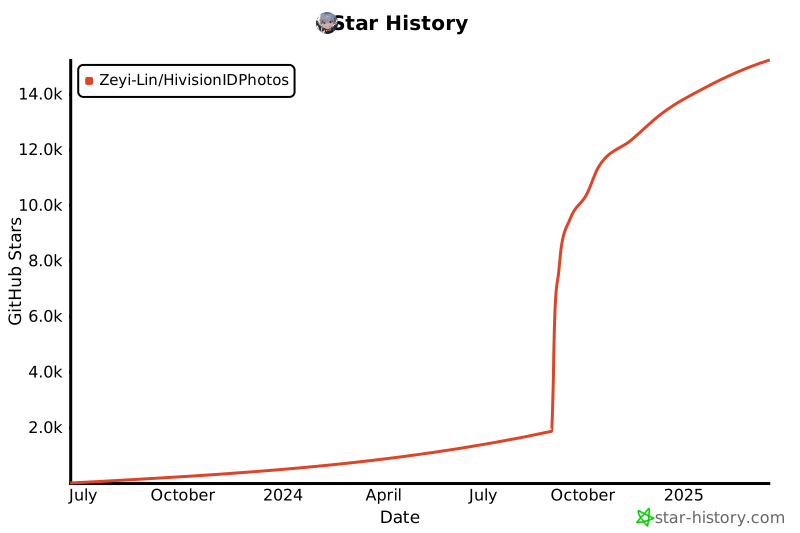](https://star-history.com/#Zeyi-Lin/HivisionIDPhotos&Date)
|
||
|
||
[github-stars-shield]: https://img.shields.io/github/stars/zeyi-lin/hivisionidphotos?color=ffcb47&labelColor=black&style=flat-square
|
||
[github-stars-link]: https://github.com/zeyi-lin/hivisionidphotos/stargazers
|
||
|
||
[swanhub-demo-shield]: https://swanhub.co/git/repo/SwanHub%2FAuto-README/file/preview?ref=main&path=swanhub.svg
|
||
[swanhub-demo-link]: https://swanhub.co/ZeYiLin/HivisionIDPhotos/demo
|
||
|
||
[spaces-shield]: https://img.shields.io/badge/🤗-Open%20in%20Spaces-blue
|
||
[spaces-link]: https://huggingface.co/spaces/TheEeeeLin/HivisionIDPhotos
|
||
|
||
<!-- 微信群链接 -->
|
||
[wechat-shield]: https://img.shields.io/badge/WeChat-微信-4cb55e
|
||
[wechat-link]: https://docs.qq.com/doc/DUkpBdk90eWZFS2JW
|
||
|
||
<!-- Github Release -->
|
||
[release-shield]: https://img.shields.io/github/v/release/zeyi-lin/hivisionidphotos?color=369eff&labelColor=black&logo=github&style=flat-square
|
||
[release-link]: https://github.com/zeyi-lin/hivisionidphotos/releases
|
||
|
||
[license-shield]: https://img.shields.io/badge/license-apache%202.0-white?labelColor=black&style=flat-square
|
||
[license-link]: https://github.com/Zeyi-Lin/HivisionIDPhotos/blob/master/LICENSE
|
||
|
||
[github-issues-shield]: https://img.shields.io/github/issues/zeyi-lin/hivisionidphotos?color=ff80eb&labelColor=black&style=flat-square
|
||
[github-issues-link]: https://github.com/zeyi-lin/hivisionidphotos/issues
|
||
|
||
[dockerhub-shield]: https://img.shields.io/docker/v/linzeyi/hivision_idphotos?color=369eff&label=docker&labelColor=black&logoColor=white&style=flat-square
|
||
[dockerhub-link]: https://hub.docker.com/r/linzeyi/hivision_idphotos/tags
|
||
|
||
[trendshift-shield]: https://trendshift.io/api/badge/repositories/11622
|
||
[trendshift-link]: https://trendshift.io/repositories/11622
|
||
|
||
[hellogithub-shield]: https://abroad.hellogithub.com/v1/widgets/recommend.svg?rid=8ea1457289fb4062ba661e5299e733d6&claim_uid=Oh5UaGjfrblg0yZ
|
||
[hellogithub-link]: https://hellogithub.com/repository/8ea1457289fb4062ba661e5299e733d6
|
||
|
||
[github-contributors-shield]: https://img.shields.io/github/contributors/zeyi-lin/hivisionidphotos?color=c4f042&labelColor=black&style=flat-square
|
||
[github-contributors-link]: https://github.com/zeyi-lin/hivisionidphotos/graphs/contributors
|
||
|
||
[github-forks-shield]: https://img.shields.io/github/forks/zeyi-lin/hivisionidphotos?color=8ae8ff&labelColor=black&style=flat-square
|
||
[github-forks-link]: https://github.com/zeyi-lin/hivisionidphotos/network/members |